

Thank you for choosing our API for integration! The goal of this documentation is to describe how you can connect to a payment app running on Android devices and the GP tom app. This API should help you easily integrate Android-based apps developed in-house. We believe that by using our API you will integrate in no time.
Prepare everything you need
Go to the „Downloads“ section of this guide to download the latest application packages, demo applications and the AIDL library. The goal of the GP tom simulator is to avoid the need for test cards and to help simulate all instances of payment outcomes you may encounter in a production environment. We note that the API is identical in test and production.
Currently, you can simulate the following behaviour by sending the exact amount from your app:

Amount: 1111
CARD SALE SUCCESS ACCEPTED
Your application receives a successful transaction result and processes the transaction successfully on your side.
Amount: 1122
CARD SALE FAIL DECLINED
Your application receives a transaction rejection and processes the transaction the right way on your side - you see that the transaction failed.
Amount: 1123
CARD SALE FAIL TIMEOUT
There will be a payment time out on our side and your app must display the result in this spirit.
Amount: 1124
CARD SALE FAIL EXCEPTION
Simulates a condition where an exception occurs on our side - e.g. a technical failure. This is how you have to advertise the result to the user.
Demo client application
If you'd like to see how the integration works with a 3rd party app, you can download the demo client package, which includes source code that can help you understand how the integration can be done on the Android platform.
AIDL library
The AIDL library handles the communication between your application and ours - you need to add it to your development project. The latest version can be found in the download section.
Transaction progress
The transaction flow is very similar for all transaction types and consists of the steps described below. To understand the mailed payment results that can be received from the GP tom app, please refer to the „Return Codes“ article in this section. In simplified terms, the transaction flow looks like this:
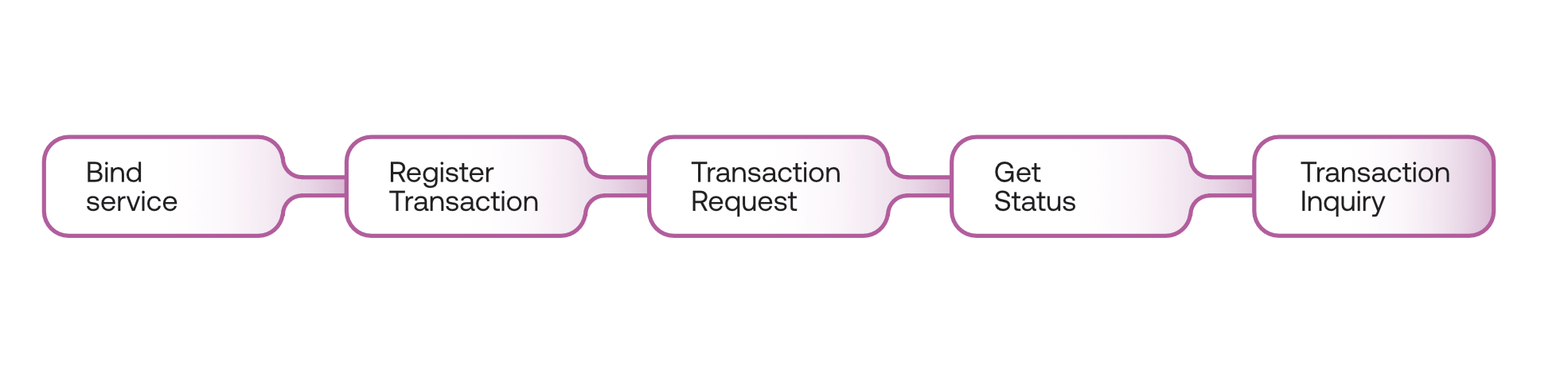
Before you can make any call in GP tom any request, you need to make sure that the user is logged in. All requests are then handled under the logged in user.
NEW Since version 1.2.0 of this API, you can check the identity of the logged-in user by sending the „clientID“ value. For more details and use case, please refer to This Article.
NEW For Android 11, please make sure you have made sure the package is visible - read more here. Otherwise, the application will not open automatically.
Binding service - bound service
The bound service is a server on the client-server interface. A bound service allows components (such as activities) to bind to a service, send requests, receive responses, and even perform inter-process communication (IPC). A bound service typically persists only when it is servicing another application component and does not run in the background for an indefinite period of time. For more information on how to work with bounding services, visit the Android Developer Portal here - Bound Service.